 |
 |

Mellau Consulting
 |
 |
 |
 |
 |
 |
 |
 |
 |
Peakfinder
|
A simple spectrum fitting program usually can fit a list of predefined peaks found using a peakfinding program. In SpectrumFit implements not only peak fitting routines but also peak searching routines. A peak searching routine tries to find in the spectrum the peaks - i.e to answer the FIRST basic question WHERE THE PEAKS ARE - and tries also to find the parameters of the lineshape function for each peak - i.e. to answer the SECOND basic question which ARE THE BEST LINESHAPE PARAMETERS -. Both tasks cant be done to some degree without fitting. The quality of a searching routine can be very easily defined : as near the parameters found by the searching routine to the final peak parameters found after fitting the spectrum as better the searching routine is. Also as near the number of peaks found in a spectrum by the search routine is near to the real number of peaks present in the spectrum as better the searching routine is. As long the peaks of the spectrum do not overlap it is very easy to construct a prefect searching routine which will found without errors all peaks and set up the peak parameters with very convenient starting values. The task becomes very complicated if the spectrum is very dense and the peaks overlap. Symath has some worldwide unique search system in founding the possible set of peaks present in a spectra with overlapped peaks. The parameters found by the searching routine are usually used as starting point for the fitting. As better the peak/lineshape parameters found by the searching routine are as better can the spectrum be fitted. Sure there is also a THIRD basic question which IS THE BEST LINESHAPE FUNCTION for each peak. In analyzing with Symath your spectrum it is allowed to define for each peak a separate lineshape function. You can select manually for each peak a lineshape function after a PeakSearch analysis. The PeakSearch system uses the "selected lineshape" for all peaks found in a PeakSearch analysis. If we allow any lineshape function at the searching level - as done in Symath - it looks as impossible to define a searching routine in a general way. If the shape that we are searching can be anything than how to search for it ? How to calculate the estimated lineshape parameters if we found for example a peak maxima if the lineshape function can be anything ? Symath has a searching routine which will try - if succeeds depends on a variety of factors which will be answered in this manual - to find in the spectrum any user defined lineshape and to find some starting parameters for the lineshape parameters independent on the lineshape function defined by the user. The PeakSearch system is very complex and you will need some routine with Symath to set up the search system for your specific lineshape function. Once all searching attributes as the estimating functions are defined you can use the lineshape without having to set up anything. The default lineshapes are already set up. Also the PeakSearch system is designed in such a modular way that it will assure in the future extensions for very specific peak searching problems. The modularity concerns two basic questions of the peak searching procedure : What to search in the spectrum and if something was found what to do with it. The user can select what to search clicking the first selection button ( with the default setting Search for maxima ) and can define what to do with the results of the searching ( in default selection what to do with the x,y data pair of the found maximum point ). In version 1.0.2 only the procedure Search for maxima is selectable, other searching procedures will come in the future versions of Symath. To use a lineshape formula for the PeakSearch system the user has to define some parameters/functions for the lineshape as the estimating functions. These functions/parameters are defined once for a lineshape and used any time the user is doing a PeakSearch in his spectrum. The set up of the estimating functions is described in the lineshape set up section of this manual. If the search functions are correctly defined the user has no more to trouble about this, it will automatically used by the PeakSearch system. The PeakSearch system parameters and calculation buttons are organized on the SymathWorkSheet in a table as shown on the figure 1. |
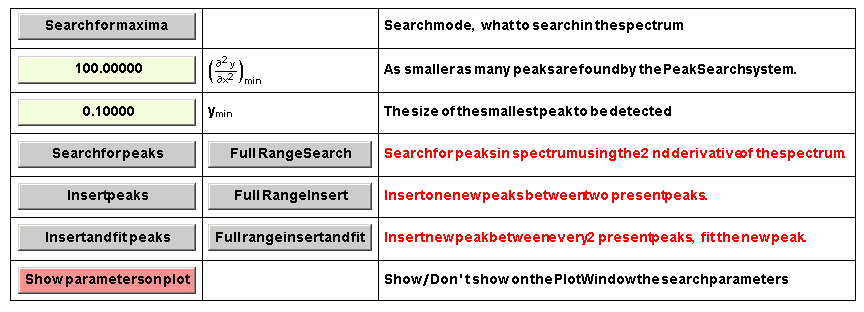
Figure 1. PeakSearch system parameters and processing buttons
As you can see for each processing task ( each row of the table ) two processing buttons are shown. The first type of searching procedure will search for peaks in an x axis range that the user has to define on the WorkingRange table. The second type of searching procedure will search for peaks in the complete spectrum using the currently defined PeakSearch parameters, i.e. the start and end x value for PeakSearch is automatically set to the spectrum x axis range. Before starting the PeakSearch procedure you have to set up the PeakSearch parameters. To demonstrate how the PeakSearch system works we will use a portion of the demo spectrum file shown on the figure 2 . The demo spectrum is on your Symath SpectrumFit CD. The best way to learn how to use the PeakSearch system is to redo all steps shown in this manual. The first selection that one has to do is to select the searching method, i.e. to select WHAT do you want that Symath has search for you in the spectrum. This depends on the spectrometric technique used, usually you will search for peak maxima. In this section we will explain how the PeakSearch system works using the default search methods called "Search for maxima". All other searching methods are explained in separate sections of this manual. The parameters shown on the PeakSearch table depend on the selected searching mode, each searching method has its own parameters.

Figure 2. Portion of the demo spectrum selected for PeakSearch
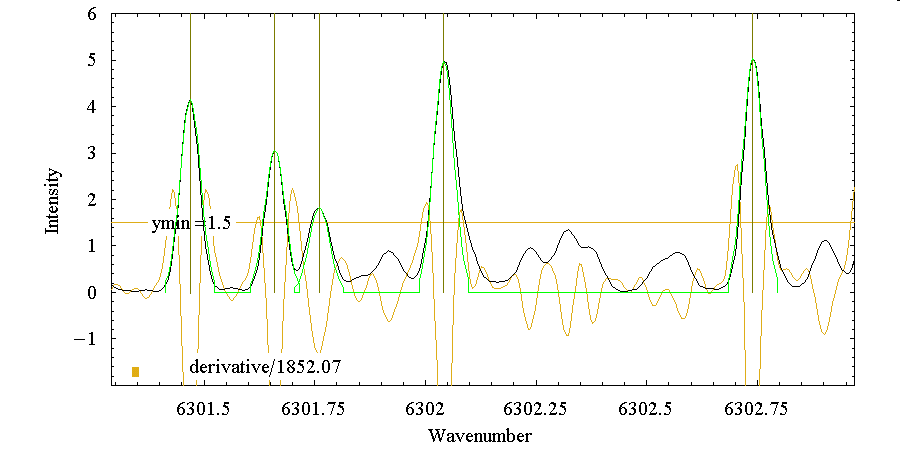
Figure 3. The result of the PeakSearch procedure using the parameter setting shown on the figure
The "Search for maxima" searching method has two parameters. The first one is the y axis minimum coordinate value allowed for a found peak maximum. You can
let Symath to display this parameter on the PlotWindow as a horizontal line at the currently selected value as shown on the figure 2 by clicking the button  .All peaks with their maximum y coordinate i.e. with their peak head below this horizontal line will not be considered as
peaks in the PeakSearch procedure. In the figure shown only the 4 most intense peaks have their peak heads above the horizontal line set to 1.5. Now if you click the button
.All peaks with their maximum y coordinate i.e. with their peak head below this horizontal line will not be considered as
peaks in the PeakSearch procedure. In the figure shown only the 4 most intense peaks have their peak heads above the horizontal line set to 1.5. Now if you click the button Symath will search in the selected x axis region for maxima and for each maximum found will calculate the lineshape of the found
peak. The result of the PeakSearch ( the found peaks are shown with their lineshape green curves and the vertical lines drawn at the peak center ) is shown on the figure 3.
Symath will search in the selected x axis region for maxima and for each maximum found will calculate the lineshape of the found
peak. The result of the PeakSearch ( the found peaks are shown with their lineshape green curves and the vertical lines drawn at the peak center ) is shown on the figure 3.
The meaning of the second parameter is a little more complicated. First consider the figure 2 with the spectra and its second derivative shown. The second derivative is
shown if you clicking the button . The derivative curve y coordinates are automatically scalled so that the
curve fits in the plot window, the scaling factor is shown on the figure also. In the left corner of the figure the value of the second PeakSearch parameter used with
the Search for maxima method - named also as "sensitivity parameter" - is drawn as a bar. The bar is scaled with the same factor as the derivative. As you can see
for each peak in the spectrum there is a minima in the second derivative curve. Some of these minima are very intense - especially for the intense spectrum peaks -
some not. The sensitivity parameter defines that all peaks which have the second derivative minimum smaller as the defined parameter value will not be considered
as peaks. This parameter is very important for peak-free spectrum portions with the spectrum curve being above the y minimum parameter. In the PeakSearch
analysis shown on the figure 3 the sensitivity parameter was set to a value much smaller as the intensities of the second derivative minima and so all peaks were found.
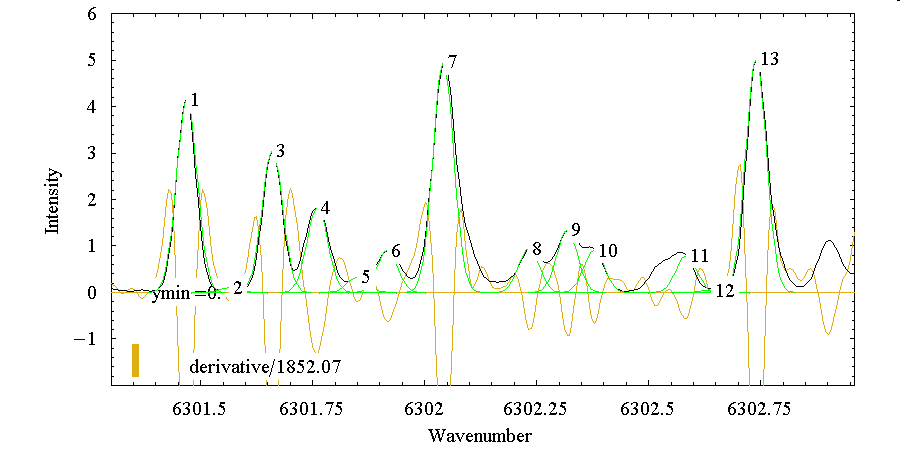
Figure 4. The result of the second PeaksSearch procedure using the changed parameter settings
To demonstrate the effect of this parameter on the peaks found by the PeakSearch system we will set the y minimum parameter to 0.0. As the complete spectrum curve is above 0.0 this parameter will have no effect on the peaks found, only the sensitivity parameter will determine if for a found second derivative minima a peak should be inserted or not. We set the sensitivity parameter to 1000 and start the PeakSearch analysis again. The result of the analysis is shown on the figure 4.
As you can see the minima between the peaks labeled 10 and 11 aren't recognized as peaks because their relative second derivative minima are smaller as the sensitivity parameter ( shown as a bar in the lower left corner of the plot ). The peak labeled 12 was recognized as a peak because its second derivative minima relative to the lower and upper maxima is greater as the sensitivity parameter. To do PeakSearch analysis you have first to found out the optimal values for these two parameters. For this you should select a typical small region of the spectrum and do a PeakSearch analysis with the selected parameter. If you found that the parameter setting is not optimal you can delete the peaks and redo the PeakSearch procedure with new search parameters.
For complicated spectra - as spectra with overlapping peaks - there are other PeakSearch strategies : First search and fit the intense peaks of the spectrum and than decrease the PeakSearch parameters and redo the search and fit procedures. The second run of the PeakSearch procedure will take in account the already present peaks and add new peaks only to suitable positions. It is very important to have in mind that you do not have to found in a single PeakSearch analysis all peaks of the Spectrum. You can any time redo the PeakSearch analysis with new parameters for any selected region of the spectrum, new peaks will always be added to the already present peaks. This feature of the PeakSearch system is VERY important for analyzing complicated spectra. In the application section of this manual you can found additional hints in using the PeakSearch system for application specific spectrum types.
Using the procedures in the PeakSearch section you can search for peaks in the spectrum and estimate the lineshape parameters for each peak found. The search parameters and processing buttons are shown on the worksheet in a table as shown on the next figure.
Here is a description for each search parameter and processing button of the SearchSystem :

Click this button to select the search mode of the Search system. In version 1.0.1 only a single search mode is implemented, the search for maxima/minima using second derivative curve. For each search mode and lineshape a set of estimating functions can be defined. This setting defines in principle WHAT we are searching in the spectrum. The searching mode to be used depends very much on the spectroscopic technique used. In FT-IR spectroscopy usually the searching for maxima i.e. peak heads will be the optimal searching method. For techniques with a derivative spectrum signal searching for zero-crossings could be the best searching method.
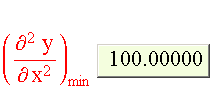
This parameter is used by the SearchSystem functions which use the second derivative of the input spectrum to detect the peaks. The parameter is the minimum height of the second derivative minimum for a peak. For each peak found the SearchSystem will calculate the intensity of the minimum found in the second derivative curve RELATIVE to the upper and lower maxima. If the intensity found is smaller that this parameter value than the peak is ignored. To set up this parameter you have to try first the default value and decrease it if necessary. Also you can let Symath to display on the PlotWindow the second derivative of the spectrum and the relative value of this parameter. You can inspect the second derivative curve in some spectrum portions and found out the best value for this parameter.
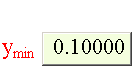
Edit on this button the size of the smallest peak in y axis coordinate dimensions. Peaks for which the peak maximum/minimum is smaller that this parameter are ignored. The PeakSearch procedures check for each new peak found if the peak head ( not the intensity i.e. peak area ) is at an y level that is higher as this parameter value. Usually you have to inspect the noise level in your spectra and set this parameter above the noise level.

Click this button to start the search for peaks in the selected WorkingRange of the spectrum. Using the selected search mode and search parameters Symath will start the selected searching procedure. This button processes only the selected x axis range and appends new peaks to the already found and inserted peaks. The result of the PeakSearch procedure will depend on the selected lineshape, lineshape estimating functions, searching mode and search parameters. For large spectra the searching procedure will need up to 1 hour time to finish.

Click this button to start the search for peaks for the complete spectrum. Using the selected search mode and search parameters Symath will start the selected searching procedure. This button processes the complete x axis range and appends new peaks to the already found peaks of the spectrum. The result of the PeakSearch procedure will depend on the selected lineshape, lineshape estimating functions, searching mode and search parameters. For large spectra the searching procedure will need up to 1 hour time to finish.

Click this button to start the insert of peaks in the selected x axis range of the spectrum. The insert mode of peak searching is intended for an iterative PeakSearch and PeakFit procedures. This function works only for a selected range of the spectrum and adds the new found peaks to the already present ones. Between evrey two already present peaks a new peak will be inserted at the "best insert position".

Click this button to start the insert of peaks in the spectrum. The insert mode of peak searching is intended for an iterative PeakSearch and PeakFit procedures. You can first let Symath search for the most intense peaks of the spectrum and than adjust using PeakFit the peak parameters of these found peaks, eventually inspecting and correcting all these peaks manually. Now you can push on this button and Symath will search for the next set of most intense peaks inserting only 1 peak between every 2 already present peaks. After such a peak insertion the number of peak can be double as it was before but not necessary, the PeakSearch parameters defining how intense a peak must be are by peak insertion procedures also active. This means that it could happen that between two preset peaks no peak can be found.

Click this button to start the insert of peaks in the selected x axis range of the spectrum. The insert mode of peak searching is intended for an iterative analysis of the spectra. If you can push on this button Symath will search for the next set of most intense peaks inserting only 1 peak between every 2 already present peaks. After such a peak insertion the new inserted peak will be automatically fitted. If the new peak overlaps with some other present peaks all these peaks will be fitted together. The present fit/fix switch setting for each peak and each parameter will be used, for the new peak the new peak default fix/fit settings - fit xz and s, fix all b[[i]] and a[[i]] parameters.

Click this button to start the insert of peaks in the spectrum. The insert mode of peak searching is intended for an iterative analysis of the spectra. If you can push on this button Symath will search for the next set of most intense peaks inserting only 1 peak between every 2 already present peaks. After such a peak insertion the new inserted peak will be automatically fitted. If the new peak overlaps with some other present peaks all these peaks will be fitted together. The present fit/fix switch setting for each peak and each parameter will be used, for the new peak the new peak default fix/fit settings - fit xz and s, fix all b[[i]] and a[[i]] parameters. The inserting and fitting procedure will start from the first present peak of the spectrum and will end at the last present peak. No peaks will be inserted before the first peak and after the last peak.

Click this button to show on the PlotWindow the search parameters. If you want to set up the search parameters you will found this option very helpful. If this option is On, an horizontal line is drawn on the PlotWindow showing the exact position of the ymin parameter. Also you will be able to display the second derivative curve with the sensitivity parameter. In this way the user can visualize the direct meaning of these parameters and will be able to found the optimum values for these parameters. You have to realize that any searching routine using second derivative curves MUST use these parameters.

Click this button to display a help table for the PeakSearch system. Symath will insert on the worksheet a table with the description of all buttons and table header elements of the PeakSearch system.
© 2007 Dr.Georg Ch. Mellau